You can try the following steps to resolve the issue with no sound from your Philips MP3 player:
No sound from my Philips MP3 player
Published on 2017-08-24
General troubleshooting advice
- Your battery may have gone flat. Please charge your player using the USB cable provided. * Check if your headphone plug has been inserted into the headphone jack of the unit completely * When you press the Play/Stop button, make sure that it is pressed and held for long enough until the display light up * Check if the volume is at an audible level. Increase the volume using the VOLUME + button. * If your player is in pause mode, press the button to resume playback If nothing works, recover your player as follows:
Recover your MP3 player
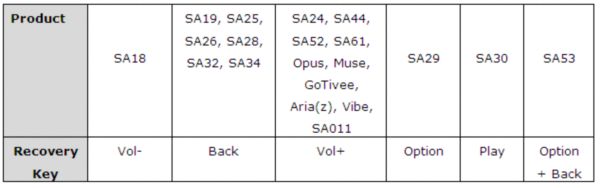
- Launch the Philips Device Manager at Start > Programs > Philips Digital Audio Player > Philips GoGear Device Manager on your PC 2. Connect your player to the PC while press and hold the corresponding recovery key shown in the table below 3. Device Manager should acknowledge your player and automatically goes into recovery mode 4. Follow the instruction of the Device Manager 5. After the player has been repaired, remove it from your PC and re-start